Alerts
Alerts provide a global view of errors and warnings across product, where users can quickly resolve the issues on priority. I helped design the alerts' user experience journey and visual design.
Role
Product research,
User journey mapping,
Brainstorming,
Lofi-to-Visual design with design system
Prototyping
Team
Product Managers - Karthikey
Design lead - Anshu George
Design manager - Naveen Kumar
Program manager(2) - Shree Harsha.
Employer
Amagi Media Labs
Duration
6 Weeks
Overview
Story behind
I am an employee at Fibonalabs (Design consultancy) as a UX designer, currently consulting for Amagi media labs as a Product Exp designer. I have been part of Amagi's core product - Amagi NOW- Alerts, which deals with errors and warnings across the product and a space that provides resolution.
Background
Amagi is modular SaaS Platform for managing and delivering media content to multiple linear and VOD platforms.
Example: Imagine you are have a movie that you want to telecast on TV or OTT, but how would you do it? So, Amagi helps as a cloud infrastructure to store, manage and deliver your content to respective spaces.
Results
Quick peek and comprehensive overview of alerts. Refined UI to represent severity and urgency of alerts. And fully designed coding ready desktop application
Impact
Quick peek and comprehensive overview of alerts. Refined UI to represent severity and urgency of alerts. And fully designed coding ready desktop application
Problem & Challenge
Categorisation of alerts amongst different products
Severity of alerts has no visual affordance
Discoverability of platforms and channels linked to an alert
Communicating impact time of an alert
How might we enhance the alerts' visual presence and it's resolution?
Solution


Design timeline

My Role
Facilitated research and collaboration with internal and external stakeholders. Provided the newer design ideas from scratch to visual design along with design components. Leaded the discussions with product and design teams with UI flow-walkthrouhgs. Furthermore I was involved in explorations for multiple layouts of alerts for the purpose of experimentation.
Persona


Research
Approach
As a junior designer I was given an opportunity to design the Alerts experience. I conducted a UX audit to current Alerts screens and provide feedback, competitor analysis, design experience for the same, visual design and conduct a testing with internal stakeholders.
Usability & heuristic evaluation
Alerts dashboard - old

Visual cue for categorisation
No visual cues to sort between different types of alerts, as every alert type is categorised into same color.

Lack of segregation in severity
Severity is sorted by urgency, but warnings and errors cannot persist at an equal level, as warnings have auto resolutions but not in case of errors.

Repetitive information in details page
User is unaware and needs to manually calculate time remaining for an alert to impact.
Competitor Analysis

Key takeaways
Visual affordance of categories
Alerts are sorted by severity and segregated by categories, this provides affordance to know the error and resolve it.
Alert statistics on dashboard
Dashborads provide a cue of alerts for users to have a quick glance of issues if any.
Central system of alerts
Alert notifications, on desktop and mobile. Also an automated email.
Design
Brainstorming
We conducted a series of experiments to determine the most effective way to communicate alerts. One approach we tried was a heat-map layout, which visually represented the criticality of alerts. However, this approach had the drawback of hiding important details such as impact time, channels, and platforms when the alert was minimized. We also experimented with other layouts in order to understand how to prioritize information and design an effective alert experience. Based on our experiments, we developed a set of guidelines for communicating alerts effectively. These guidelines include:
Use color to convey criticality.
Use clear and concise language.
Group alerts together logically.
Prioritize the most important information.
We believe that these guidelines can help to create a more effective and user-friendly alert experience.
Severity and alert representation explorations


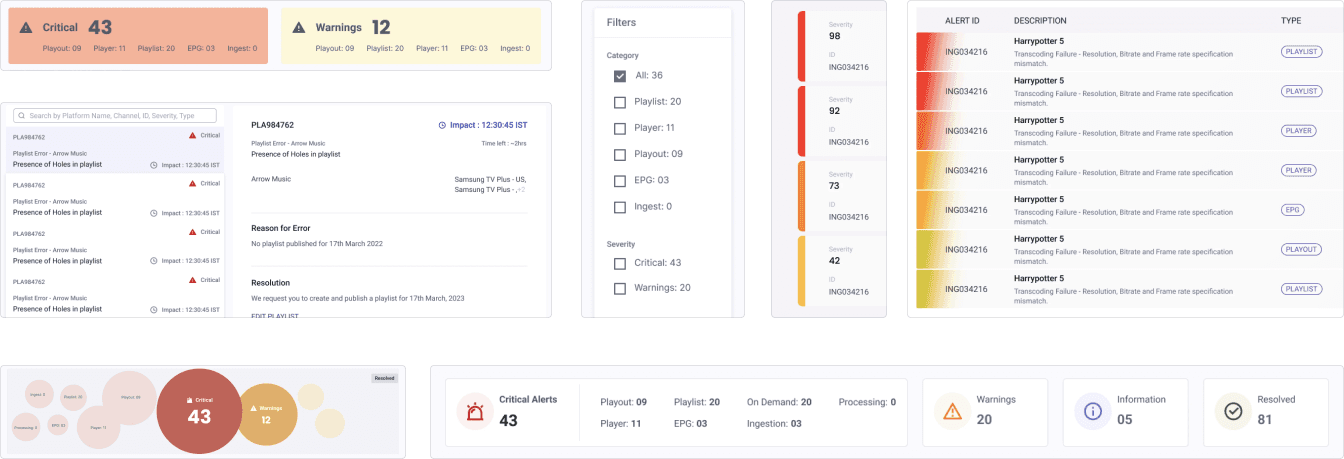
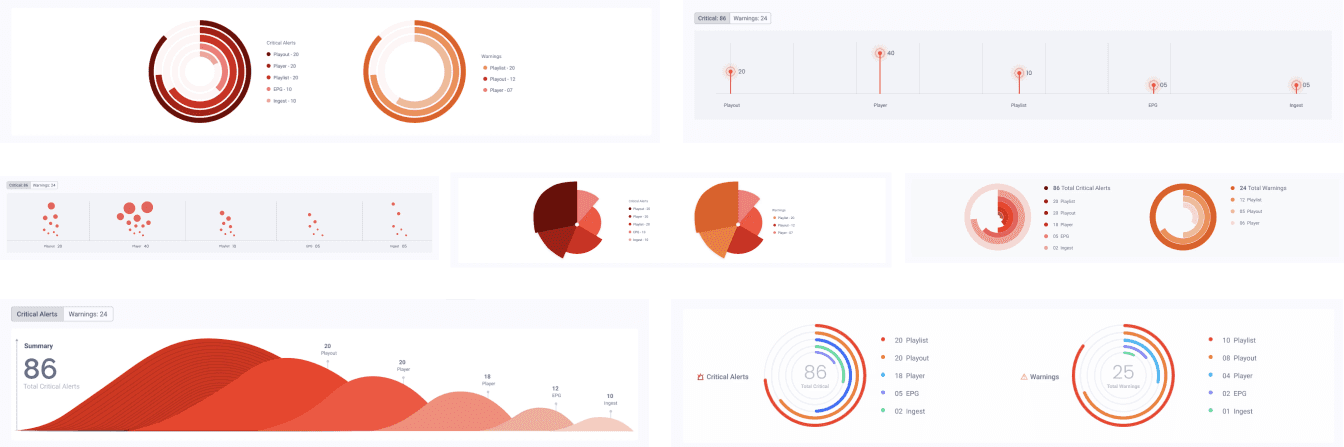
Layout explorations


High fidelity designs
Design Approach 1
Visual presence of the alerts by dividing critical errors and warnings, as the alerts can be quickly filtered and can be resolved. Also providing quick filters inside alert cards on top, filters the 'critical playlist alerts'. And details screen similar to the older version with hierarchy of information.

*Global navigation is hidden for creative purposes. Name of the client removed for confidentiality
Design Approach 2 - Finalised Design
Segregated alerts into tabs with badges consisting number of alerts, and brought out CTA button for resolution. Additionally, to provide an efficient experience in viewing alert details, we put information inside the right panel for quick view and let users stay on the same page.

Sai Dheeraj C . 2024
India